Operational control of occupational health

Take control of occupational assessments, expiry dates and follow-up.

GEXDI connects worker, job, site, tests, fitness for duty and follow-up in a traceable occupational record. The medical team documents the case; HR sees the status authorized for its site.

Work contextExpiry datesFitness for dutyFollow-up

Clinical care, surveillance and evidence on a single platform.

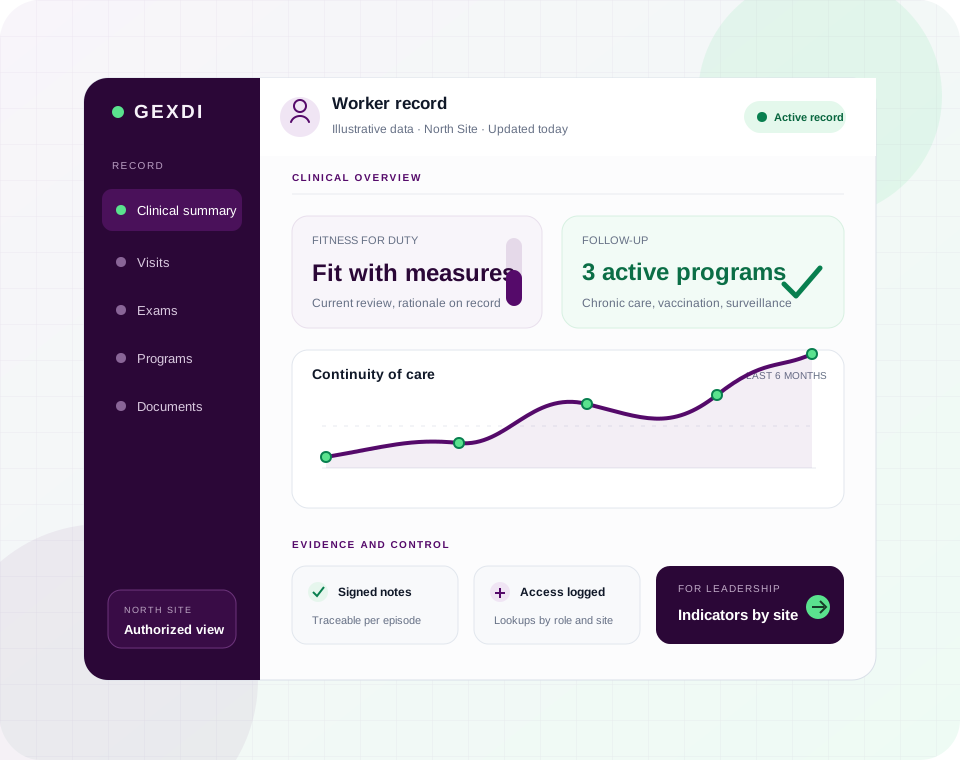
Illustrative view of GEXDI Full showing fitness for duty, preventive programs, clinical continuity and documented evidence
  1. 01Attend
  2. 02Follow up
  3. 03Evidence
Product viewProduct representation with illustrative data.
Capabilities

Clinical practice and business management, connected.

GEXDI Full helps the medical service treat and follow up. At the same time, it gives HR and leadership the authorized information they need to coordinate resources, review progress and make decisions.

01

Places every worker in their work context

The record shows where the person works, what job they hold and what employment information should accompany their care.

  • Relates the worker to company, site, department, area and job.
  • Maintains catalogs of jobs, tests and risk classifications.
  • Lets each user review the population of the sites assigned to them.
02

Holds the complete clinical history in a single record

Health staff find history, consultations and tests without rebuilding the case from separate files.

  • Brings together work history, medical history, physical examination, anthropometry and clinical interpretation.
  • Documents structured clinical notes, diagnoses, treatments, prescriptions and measurements.
  • Keeps earlier notes, tests, documents and the worker’s files available.
03

Organizes assessments and communicates fitness for duty

Guides pre-employment and periodic assessment, from the tests requested to the medical certificate.

  • Shows which pre-employment and periodic exams are still pending.
  • Records results, consents and the tests defined by the organization.
  • Issues certificates with the fitness outcome and the restrictions indicated by the physician.
04

Follows up on risks and preventive programs

Helps continue care after an assessment and keeps pending reviews in sight.

  • Covers hearing, respiratory, vision, toxicology, cardiometabolic and musculoskeletal surveillance.
  • Supports programs for chronic conditions, pregnancy, lactation and vaccination.
  • Stores results, upcoming reviews and follow-up actions in the record.
05

Coordinates appointments, medical leave and job changes

Brings together the medical schedule and the employment events that need follow-up between the health service and the company.

  • Organizes appointments in monthly, weekly and daily views.
  • Sends reminders by email or text message when those channels are enabled.
  • Records medical leave, changes in employment status and job reassignments.
  • Documents prehospital care and other work-related health events.
06

Lets staff sign in with their corporate account

People can access GEXDI with the account they already use at their organization, with additional security options available.

  • Offers single sign-on with Microsoft Entra ID, Okta or other OIDC-compatible providers.
  • Also supports local access with two-step verification and recovery codes.
  • Allows closing sessions and renewing access when the organization requires it.
07

Defines what each profile sees and manages

Physicians, HR and leadership get the level of access their responsibility calls for, without opening the whole record to everyone.

  • Assigns specific permissions for clinical tasks, administrative tasks, documents and reports.
  • Limits access to the companies and sites authorized for each user.
  • Allows switching between assigned sites without using a second account.
08

Backs every episode of care with documents and evidence

Keeps together the files, consents, signatures and records needed to review how care was documented.

  • Allows uploading, viewing and downloading the worker’s files.
  • Stores consents, captured signatures and signed clinical notes.
  • Retains access records, system activity and session security data.
09

Surfaces progress and gaps so decisions can be made

Turns clinical and operational records into a clear view of the work done, the coverage reached and the information still missing.

  • Presents occupational health dashboards and indicators configured for the organization.
  • Helps identify coverage, platform usage and incomplete records.
  • Exports authorized information to Excel, CSV or JSON and shares schedules through ICS-compatible calendars.
10

Eases the launch and the growth that follows

The organization can bring in existing information and add specialized functions as implementation advances.

  • Checks files before importing workers and reports the progress or the errors of each load.
  • Allows loading exam results in bulk when that function is enabled.
  • Can add Psychology and Nutrition, and run on SQL Server or PostgreSQL infrastructure.

Available functions are defined with each organization according to the modules, sites, identity providers and type of deployment agreed.

Data governance

Operational status does not require exposing the whole clinical record.

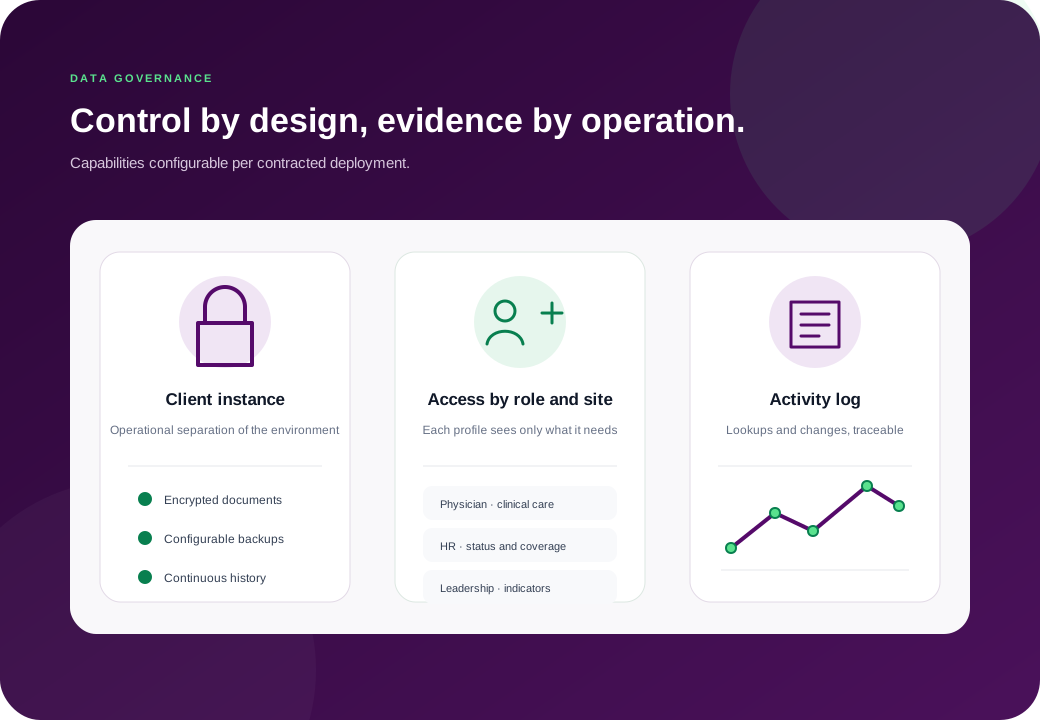
Access is configured by role and site. The demonstration should validate which fields each profile can view, create, modify, sign or export.

Permissions by role and site
Access aligned with authorized duties and locations.
File encryption
Protection for stored clinical documents within the agreed technical scope.
Activity log
Traceability of relevant lookups and changes.
Illustrative architecture with the client instance, role-based access and an activity log
Conceptual diagram. The final configuration depends on the contracted deployment.
Use cases

Choose the use case that best represents your operation.

Six representative cases, from getting a scattered record in order to consolidating several plants. Each one documents its stages and the evidence it leaves behind. Fitting more than one is normal: scope and criteria are agreed after reviewing your process.

  1. 01Get the record in order and arrive with evidenceAudited by customers
  2. 02Determine fitness for duty with your own criteriaRegulated exposure
  3. 03Sustain preventive programs all year roundPopulation health program
  4. 04Consolidate several plants without mixing their dataMulti-plant with IT and Compliance
  5. 05Trace exposure when people move aroundHigh internal rotation
  6. 06Receive results from external laboratoriesFull and LiteTesting by an external provider
Where the product fits

Full fits when the team has to treat and coordinate follow-up inside the organization.

On-site medical serviceConsultations, exams and follow-up during the shift.
Multi-site operationsLocal criteria and consolidated indicators with authorized access.
Manufacturing, logistics and exportOccupational evidence organized for internal and external reviews.
Another way to operate

Does your record work only with digitized files?

GEXDI Lite organizes files, expiry dates and coverage for administrative teams.

Explore GEXDI Lite
Frequently asked questions

What you need to evaluate the next step.

Visibility is configured by role and site. The demonstration reviews which statuses, expiry dates, coverage or operating restrictions each profile needs, and what information stays limited to authorized clinical staff.
Scope can relate events, jobs, sites and criteria configured by the organization. The pilot should validate a representative matrix and its exceptions before extending it to the whole operation.
Not necessarily. Scope can start with one process, one site and a previously anonymized sample, to validate catalogs, permissions, data capture, outputs and acceptance criteria before widening the migration.
No. Responsibility for compliance and for clinical decisions belongs to each organization and its authorized professionals. GEXDI helps keep records, owners, dates, follow-up and evidence in order within the configured scope.
A demonstration built on one case

Let’s review a fitness decision and the evidence your operation needs.

We walk through work context, assessment, determination, follow-up and permissions using a case representative of your process.

  • We use fictitious data or a previously anonymized sample.
  • We validate what the medical team, HR and leadership can each see.
  • We agree on the flow, the exceptions and the metrics for the pilot.

Request a conversation

These details let us frame the right context and prepare a relevant proposal.

Enter your name.
Enter the company name.
Enter a valid email address.
Describe processes and goals. Avoid names, diagnoses or any clinical data about workers.

This information is used for internal communication and classification.